Salesperson Notification Overview
You can instantly and automatically notify your salespeople when a visitor is scanned. Notifications are controlled through configurable rules (called Territories) that determine who should be notifi…

You can instantly and automatically notify your salespeople when a visitor is scanned.
Notifications are controlled through configurable rules (called Territories) that determine who should be notified. You can manage many of these rules yourself, while others can be configured for you as needed.
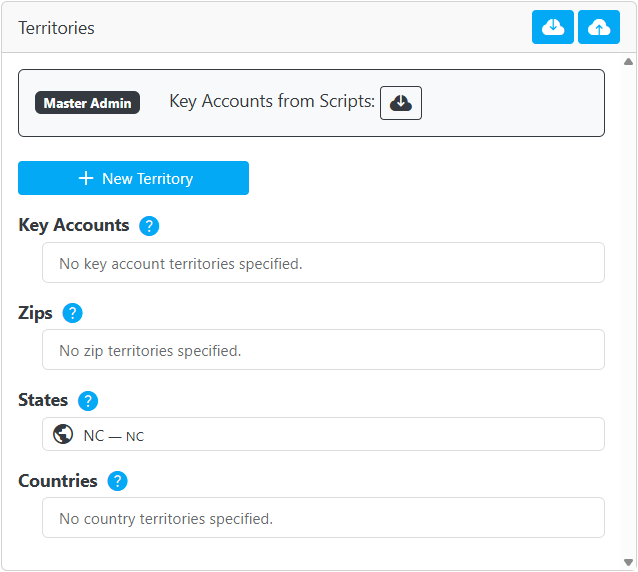
Each rule can be assigned to one or more people (called Recipients) who will automatically be notified. You can manage the people yourself.
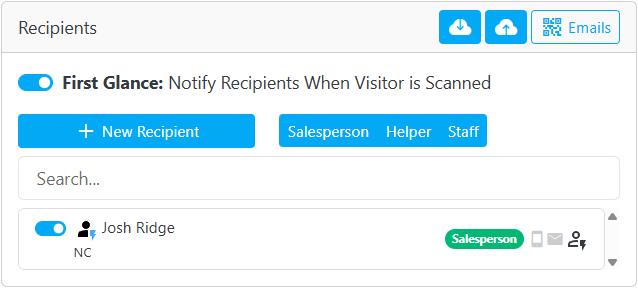
There is a fee of $5 per 100 notifications.
Notification Types
Each person can be notified by any combination of these methods:
- Text message (SMS)
- Lighting Leads app
There is a fee for notifying a person, but it is a flat fee regardless of how many notification types are used. For example, if you configure a person to receive text and email notifications, the fee is the same as it would be if you configure them to only receive text notifications.
Standard Geographic Rules (Included)
Basic notification rules can be created based on the visitor’s geographic information. These rules are included at no additional cost.
Supported geographic criteria:
- ZIP Code
- State
- Country
Use these rules when you want to trigger notifications based solely on where a visitor is located.
Manage these rules yourself at the zentrest web portal.
Key Account Rules ($99 Flat Fee)
Key account rules allow you to target notifications based on a visitor’s email address or email domain.
Manage these rules yourself at the zentrest web portal.
Examples:
- Notify a sales manager, rather than the local salesperson, when anyone from
bigclient.comis scanned. - Notify the ecommerce director when anyone from
wayfair.comoramazon.comis scanned.
Pricing:
A $99 per event fee enables you to create unlimited key account rules.
Custom Attribute Rules ($99 Flat Fee)
If you need more advanced notifications, custom rules can be configured using any registration data captured during the event signup process.
Contact us to create custom rules. Once they are created, you can assign recipients and make some adjustments yourself at the zentrest web portal.
Examples of custom rule criteria:
- Business type
- Annual sales volume
- Job role
- Industry
- Any other registration data your event collects
Examples of custom rules:
- Notify one set of salespeople when a visitor registered as a "Furniture store" is scanned, and another set of salespeople when a visitor registered as "Interior designer" is scanned.
- Notify the VP of Sales when anyone with a sales volume over $10 million is scanned.
- Notify a marketing person when someone registered as "Press" is scanned.
Pricing:
A $99 per event fee covers unlimited custom rules.
How did we do?
Visitor Email Overview
Prompt for Comments Overview
