Visitor Email Overview
Instantly send each visitor a personalized email, letting them know about your showroom events, how to sign up for an account, or just thank them for their visit.

Updated
by Joshua Ridge
First Glance can instantly send email to scanned visitors.
There is no additional fee to use this feature.
When Emails Are Sent to Visitors
If enabled, the system can send an instant email to the visitor at the moment their badge is scanned.
Common uses include:
- Thank-you or welcome messages
- Links to product information
- Follow-up instructions
- Promotional content, such as events happening in your showroom
These emails are sent without requiring any manual action from your staff.
How to Manage Email Behavior
You control when visitors receive emails and the content of the email through web portal settings.
Web Portal Access
- You'll login to the Zentrest portal (app.zentrest.com).
- From the portal, you manage each event's settings by clicking your company name at the top, then Events. Note that you must be an Administrator to access the Events area.
- You can enable the Send a personalized welcome email to visitors? feature, where you can enter a Subject and Body for the email.
- The email Body can utilize smart tags, which are dynamic placeholders that get replaced with actual data when the email is sent. For example, you can add a smart tag for Visitor Name, which will be replaced with the actual visitor's name. Click the Insert button in the Email Body's toolbar.
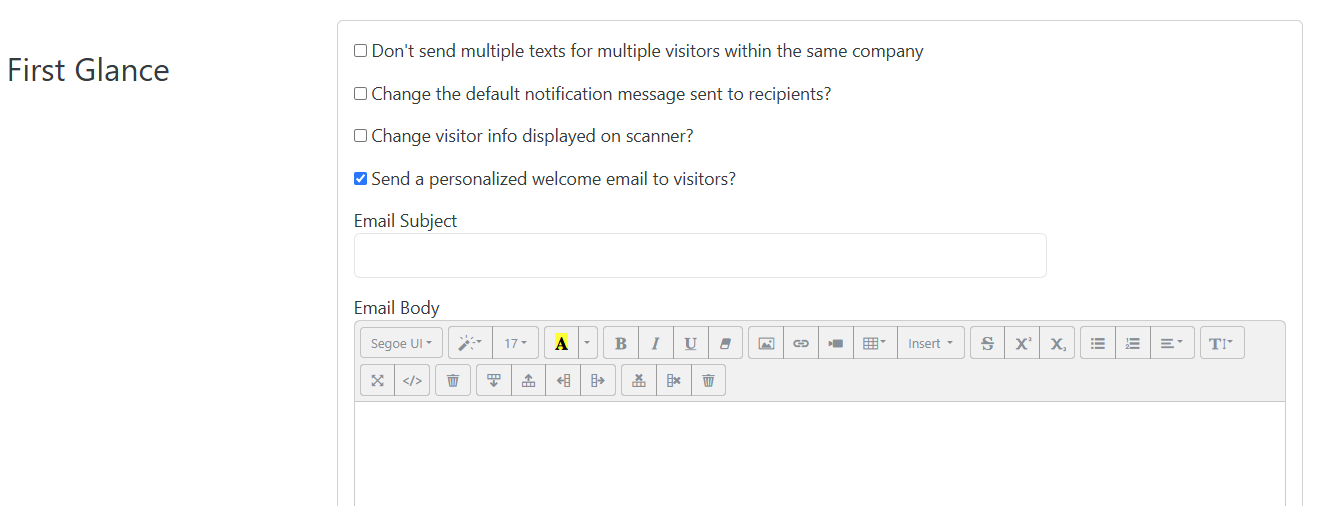
Here is a more thorough article: HOW TO: Visitor Emails
Salesperson Notifications vs. Visitor Emails
- Notifications (text, email or Lightning Leads app) are used to notify your salespeople, not the visitor. Learn More
- Visitor Emails are sent to the visitor directly and can be enabled or configured for each event.
- Visitors are only able to be automatically emailed, not texted.
Email Delivery Process
- A visitor’s badge is scanned using the First Glance app.
- The system decodes the visitor’s information and adds the visitor the list of visitors in your Zentrest account.
- If the visitor-email feature is enabled: The system sends the designated email template to the visitor’s email address.
- All of the email activity is logged for each visitor, allowing you to see when the email was delivered and if/when it was opened by the visitor.
Emails to visitors are sent reliably and immediately, allowing exhibitors to provide a polished and professional experience.
How did we do?
Salesperson Notification Overview
